
Grok Imagine 1.5
Grok Imagine 1.5 AI Video Generator
Turn one photo into a 6–15 second video with sound using xAI's Grok Imagine 1.5. Pick 480p or 720p and one of five aspect ratios; most clips are ready in about a minute, from 5 credits per second.
What is Grok Imagine 1.5?
Grok Imagine 1.5 is the video model from xAI, the company behind Grok. xAI released it as a preview on June 3, 2026 and made it generally available on June 16, 2026 as grok-imagine-video-1.5 in its API and as "Video 1.5" in the Grok apps (announcement). xAI says 1.5 generates sound effects, ambience and dialogue in the same pass as the picture, with clearer, better-synced speech, fewer warped frames and more believable physics than the original Grok Imagine.
On Artificial Analysis, the 1.5 preview debuted second in Image-to-Video with audio, behind Seedance 2.0. By October 2026 newer models had pushed it to ninth. It is not the most detailed model you can use today, but it is one of the cheapest ways to get a believable clip with sound from a single photo.
On Flux1 AI, Grok Imagine 1.5 is image-to-video: you upload one picture, describe what should move, and choose length, resolution and shape. Clips run 6–15 seconds at 480p or 720p and come back with an audio track. In our tests a clip took 40–70 seconds. The page runs on a third-party API channel, so some features of xAI's own API are not available here; they are listed under "Good to know" below.
- Developer
- xAI
- Released
- June 16, 2026 (preview June 3)
- Mode on Flux1 AI
- Image-to-video, one image per clip
- Length
- 6–15 seconds
- Output
- 480p or 720p, with sound
- Aspect ratios
- Match image, 16:9, 9:16, 1:1, 3:2, 2:3
- Typical wait
- About 40–70 s in our tests
- Cost
- 5 credits/s at 480p, 8 at 720p
What Grok Imagine 1.5 does well
The four things that make it worth choosing over the other video models here.
Sound in the same pass
Every clip comes back with audio: rain, footsteps, café noise or speech, generated together with the picture rather than added afterwards. All three examples on this page have their own soundtrack. Describe what we should hear in the prompt and Grok follows it.
Your photo stays the first frame
The uploaded image is the opening frame, so faces, products and backgrounds stay as you made them. Choose "Match image" to keep the photo's shape, or pick 16:9, 9:16, 1:1, 3:2 or 2:3 to reframe it for a feed, a story or a widescreen edit.
Natural motion and physics
xAI's 1.5 update focused on fewer warps and more believable movement. In practice it handles turning heads, steam, rain, animals and handheld camera drift well. Slow, continuous actions look best; several cuts or fast choreography in one clip are where it struggles.
Low price per second
At 5 credits per second at 480p and 8 at 720p, an 8-second clip costs 40 or 64 credits. That is the lowest per-second price of any video model with sound on Flux1 AI, so it suits drafts, social clips and trying several prompts on the same photo.
Made with Grok Imagine 1.5
Real outputs from this page with the exact prompts, unedited. The small picture is the image each clip started from. Turn the sound on.
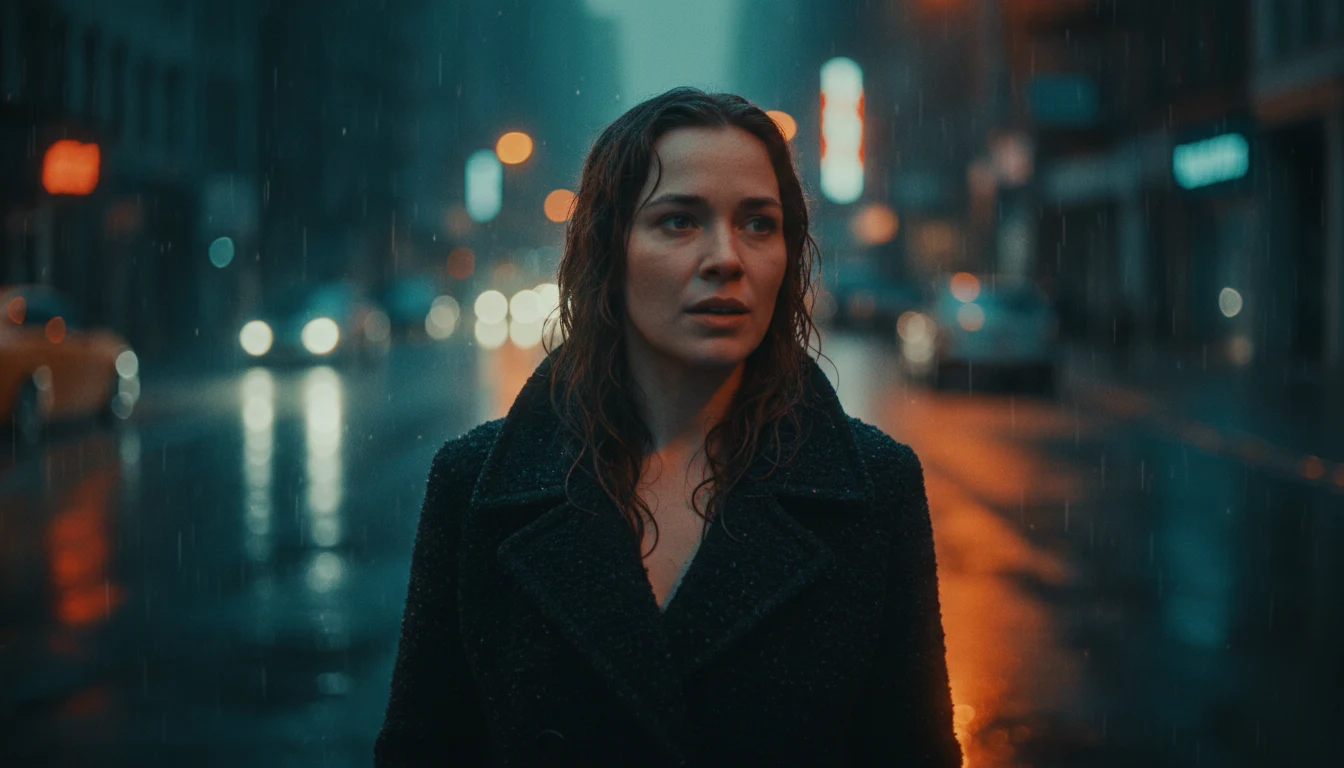
A portrait that turns to camera
The same photo we use on the Wan 3.0 page, animated with a slow push-in. Hair and rain move naturally and the face stays consistent; the soundtrack is steady rain and traffic.
Prompt · 16:9 · 480p · 8s: She slowly turns to look straight into the camera as the rain keeps falling. The camera pushes in. Headlights from a passing car sweep across her face.

A vertical product moment
A still life reframed to 9:16 at 720p for stories and reels. The hand enters, lifts the cup and the steam keeps moving. A 6-second clip like this costs 48 credits.
Prompt · 9:16 · 720p · 6s: Steam rises and curls from the coffee cup. A hand slides into frame and lifts the cup. Soft morning light, the camera drifts slowly to the right.

An animal with personality
Square framing for social feeds. The dog shakes off the rain and trots forward, with paw steps and splashes in the audio. 10 seconds at 480p.
Prompt · 1:1 · 480p · 10s: The corgi shakes the rain off its coat, then trots toward the camera wagging its tail. Raindrops splash on the cobblestones.
How to use Grok Imagine 1.5
Four steps from photo to video. Credits are refunded automatically if a clip fails.
- 1
Upload a photo
PNG, JPG or WEBP up to 10MB. It becomes the first frame, so crop it the way you want the shot to open. Clear, well-lit images give the steadiest results.
- 2
Describe the motion
Say what moves, how the camera behaves and what we hear, in two or three sentences. You don't need to describe what is already in the photo.
- 3
Pick shape, resolution and length
"Match image" keeps your photo's proportions. Choose 480p for drafts and 720p for final clips, and set 6–15 seconds. The credit cost on the button updates as you change them.
- 4
Generate and download
Most clips arrive in about a minute. You can leave the page: finished videos land in My Videos, where you can download the MP4. Rejected or failed clips are refunded in full.
Prompt tips for Grok Imagine 1.5
The image already sets the scene, so spend your words on movement, camera and sound.
Grok Imagine 1.5 vs other video models on Flux1 AI
All of them use the same credit balance. The last column is the price of the same 8-second 720p clip.
| Model | Best for | Starts from | Length | Max resolution | Credits for 8 s |
|---|---|---|---|---|---|
| Grok Imagine 1.5 | Cheap image-to-video with sound | Image | 6–15 s | 720p | 64 |
| Wan 3.0 | Long clips, text, frames or references | Text, image or references | 2–30 s | 1080P | 144 |
| Seedance 2.0 Mini | Budget Seedance with audio | Text or image | 4–15 s | 720p | 280 |
| Seedance 2.0 | Multi-shot scenes and motion detail | Text or image | 4–15 s | 720p | 576 |
| Seedance 2.5 | Highest quality on the site | Text or image | 4–15 s | 720p | 896 |
Grok Imagine 1.5 vs Wan 3.0
Both add sound, and the first example above uses the same photo as the Wan 3.0 page, so you can compare them directly. Wan 3.0 does more: text-to-video, first and last frames, reference images, clips and audio, up to 30 seconds and 1080P. Grok Imagine 1.5 only animates one photo, but costs 64 credits for 8 seconds at 720p against 144 for Wan 3.0. Use Grok for quick, cheap image-to-video; use Wan when you need control or length.
Grok Imagine 1.5 vs Seedance 2.0
When the 1.5 preview launched, Artificial Analysis ranked Seedance 2.0 just above it for image-to-video with audio, and Seedance still produces finer detail and steadier multi-shot motion. It is also far more expensive here: 576 credits for 8 seconds at 720p versus 64. Many people draft with Grok and render the final shot with Seedance.
Grok Imagine 1.5 pricing on Flux1 AI
You pay per second of video at the resolution you pick. Audio is included at no extra cost.
| Clip | Settings | Credits |
|---|---|---|
| Shortest | 6 s at 480p | 30 |
| Default | 8 s at 480p | 40 |
| Default, sharper | 8 s at 720p | 64 |
| Longest | 15 s at 720p | 120 |
How far a plan goes
Basic · 300 credits/mo
≈ 7 clips of 8 s at 480p, or 4 at 720p
Pro · 800 credits/mo
≈ 20 clips of 8 s at 480p, or 12 at 720p
Max · 2000 credits/mo
≈ 50 clips of 8 s at 480p, or 31 at 720p
Credits are charged when you press Generate and refunded automatically if the clip is rejected or fails. New accounts get 10 free credits, which is not enough for a 6-second clip (30 credits).
Good to know
What this page does and doesn't offer compared with xAI's own Grok Imagine.
Image-to-video only
xAI added text-to-video, native 1080p and up to 14 reference images to its API on July 31, 2026. This page uses one image per clip, up to 720p. For text-to-video, references or 1080P, use Wan 3.0.
6 to 15 seconds
xAI's API allows 1–15 seconds, but the channel used here renders at least 6, so shorter lengths are not offered (they would cost the same as 6 seconds). Ratios are limited to 16:9, 9:16, 1:1, 3:2 and 2:3, or the shape of your image.
Sound is always on
Audio is generated with every clip and can't be switched off here. If you need a silent clip, mute it in your editor; the price is the same either way.
Content checks
Prompts and images are screened before generation, and the model provider moderates outputs too. Sexual content, sexualized depictions of real people and copyrighted characters are refused. Grok's "spicy" mode exists only in xAI's consumer apps and is not available here. Refused clips are refunded.
Grok Imagine 1.5 FAQ
Is Grok Imagine 1.5 free?
Not on Flux1 AI. A clip costs from 30 credits (6 seconds at 480p), and new accounts get 10 free credits, enough to try the image models but not a Grok clip. Free limits in xAI's own Grok apps change often; check grok.com for the current offer.
When was Grok Imagine 1.5 released?
xAI released a preview on June 3, 2026 and made Grok Imagine 1.5 generally available on June 16, 2026. On July 31, 2026 xAI added text-to-video, native 1080p and reference images to its API. The original Grok Imagine launched in August 2025.
What changed from the original Grok Imagine?
According to xAI, 1.5 generates sound effects, ambience and dialogue together with the picture, syncs speech better, and has fewer warped frames and more believable physics. xAI also introduced a faster "Video 1.5 Fast" option in the Grok apps.
Does Grok Imagine 1.5 make videos with sound?
Yes. Every clip generated on this page comes back with an audio track, such as ambience, effects or speech. You can describe the sound in the prompt. It can't be turned off here.
How long can Grok Imagine 1.5 videos be?
On Flux1 AI, 6 to 15 seconds per clip. xAI's API allows 1–15 seconds. For longer videos, generate several clips and join them, or use Wan 3.0, which goes up to 30 seconds.
Is there a Grok Imagine 1.5 API?
Yes. xAI offers it as grok-imagine-video-1.5 and lists $0.08 per second at 480p and $0.14 at 720p on its model page. This page is a no-code way to use the model with the same credits as the rest of Flux1 AI.
Grok Imagine 1.5 vs Veo, Kling or Seedance: which is better?
For detail and complex motion, Seedance and Veo usually win. As of October 2026, Grok Imagine 1.5 ranks ninth for image-to-video on Artificial Analysis. Its strengths are price and speed: an 8-second 720p clip with sound costs 64 credits here, a fraction of Seedance 2.0's 576.
Can I make NSFW or "spicy" videos?
No. Spicy mode is a feature of xAI's consumer Grok apps, not of the API this page uses. Prompts and images are checked before generation and outputs are moderated; anything refused is refunded automatically.
Bring a photo to life with Grok Imagine 1.5
Upload an image, describe the motion and get a clip with sound in about a minute.